
Lisa LaCivita

What to read?
This age old question has new solutions. The library now subscribes to a feature called NoveList. NoveList can be reached from the HRLS homepage by hovering over “Research & Learn” then under “Subjects” click on “Reviews and Recommendations.”
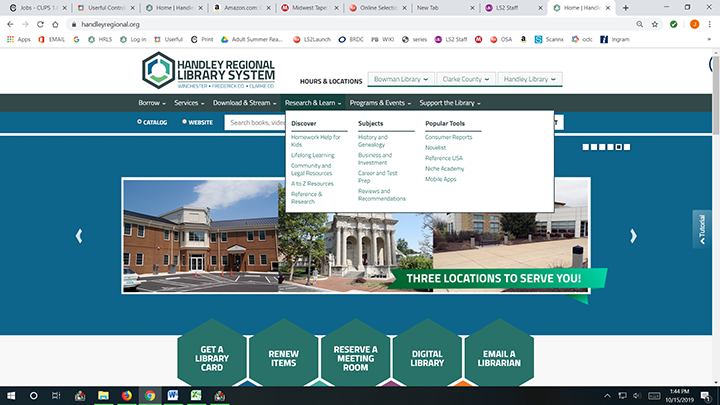
Scroll down under the graphics and you will see a link for NoveList. (There is a NoveList for kids too!). Once you click on the link you will be taken to the NoveList homepage.
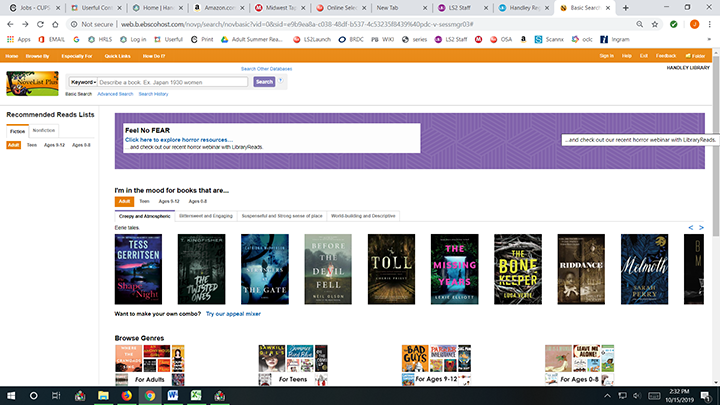
Along the left side you can find suggestions for fiction or non-fiction and browse by genres.
At the top of the page is a box with five search options. The keyword/subject search will look for books matching the keyword and subject. You can use the title or author (narrator or series) to search for “read-alikes” or books by other authors that you may also appreciate.
As an example, I enjoyed the “Soul of the Night” by Chet Raymo. If I put the book title in the search box, then I get nine suggested titles for other books to read. If I put in the author’s name then I get the names of nine other authors whose works I might enjoy. I had better results with read-alikes for the author than for the book title. It may take some exploring and/or trial and error to come up with a good match, but NoveList is a great tool. There is also a menu item: “How do I?” that provides information about searching. Investigate the other menu options: “Browse By”, “Especially For” and “Quick Links.” Niche Academy (another great library resource) has a video tutorial about Novelist. Explore and Enjoy!